The Pieps Freeride was released in 2008 and discontinued in 2015. Please read the Conclusion on this page before you considering using the Freeride.
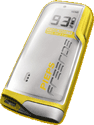
Summary: The Freeride is a single-antenna digital transceiver. This is definitely the smallest avalanche transceiver (20% smaller and 60% lighter than the Tracker 3).
Searching: As a single-antenna transceiver, the Freeride cannot display a direction indicator that points you to the victim. Instead, you must manually locate victim by using the Freeride's distance indicator to find the shortest distance. The lack of a direction indicator is a significant disadvantage relative to multiple-antenna transceivers. The range of the Freeride is very short (only 31 meters in the 10 tests I've performed).
The display contains an arrowhead that grows when the transceiver senses a strong signal. This is similar to the arrowhead displayed by the Ortovox M2. The arrow can be a little misleading, as it is showing signal strength rather than direction.
Multiple Burials: The Freeride displays three little dots on the screen if there is more-than-one victim (the distance to the closest victim is always displayed). You will need to use the expanding circle or micro search strips techniques to locate the additional victims (which is a little challenging without a direction indicator). The Pieps Freeride can be suppressed using the Pieps iProbe.
Spikes: The Pieps Freeride has only one-antenna and as such, it suffers from spikes (i.e., the strongest signal may not be directly over the buried victim). In an extensive spike testing session, the Freeride often reported that it was directly over the transmitting beacon when it was actually 1.1 meters to the side.
Controls: You turn the Freeride on/off by twisting the battery door. It looks like it might be possible to unintentionally turn on the Freeride via a bump in your car or luggage.
You switch the Freeride from transmit to search mode by pressing a lone "Send-Search" button three times. That is similar to the Barryvox 3000 (an otherwise great transceiver) and is unacceptably complex.
By default, the Freeride does not automatically revert from search to transmit mode. To change this setting, turn on your Freeride and wait until a "P" and a number is displayed. Then press-and-hold the Send-Search button to cycle between P0 (never return to transmit), P3 (return after 3 minutes), P5 (after 5 minutes), or P8 (8 minutes) is displayed. When you see the value you want, release the Send-Search button. Each time you turn on your Freeride, this P number will be displayed on the screen for a few seconds. If you use the default mode (never return to transmit), press and hold the button for 2 seconds to return to transmit. (Shall I add, "Less than intuitive?")
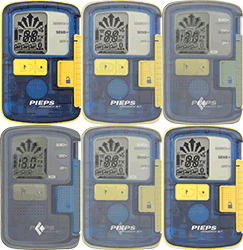
If you press the Send-Search button while in Search mode, it turns on the screen's (somewhat weak) backlight. Press it a second time and the "transmission check light" (the little LED that normally blinks to indicate that the transceiver is transmitting) turns on so you can use it as a tiny emergency light.
Other: The Freeride (as with version 5.0 and later models of the Pieps DSP) supports the iProbe. The Freeride has the shortest warranty of any of the beacons (two years). The user manual was improved significantly in the Fall of 2009.
Alternative: Pieps released the minuscule " Pieps Micro" transceiver which is the smallest three-antenna transceiver ever. It is a much better alternative for skimo racers (i.e., small and light) than the small-but-lame Freeride.
Conclusion: The Freeride might be a reasonable choice for people who want a tiny transceiver (e.g., for skimo racing) or who already know how to search without a direction indicator (and who are willing to do very narrow search strips), but it is not appropriate for people who are purchasing their first transceiver or who have been using a multiple antenna transceiver. These folks won't understand the additional practice required to search using a single-antenna transceiver. Please don't skimp on price and give this as a gift to a novice.